Why I Don’t Trust "Free PDF Converters" (And Why I Built My Own)
Hi everyone. I am a cybersecurity student. My days are spent learning about how networks work, how hackers steal data, and how easy it is to make a mistake online. Because of my major, I see the internet differently than most people.
When my friends need to edit a PDF file, they usually Google "free PDF merge" and click the first link. This makes me nervous. I always ask them: "Do you know where that file just went?"
Most people think the internet is a cloud, and clouds are soft and safe. But in my classes, we learn that "the cloud" is just someone else’s computer. When you upload a file, you are giving a copy of your personal information to a stranger.
That is why I want to talk about PrivatePDF.tech. I built this because I wanted a tool that I could trust with my own data. I want to explain why client-side processing is safer, and be honest about when a server is actually needed.
The Problem with Uploading Files
Let’s talk about how most free websites work. This is the "server-side" model:
- You have a file on your laptop.
- You upload it to the website.
- The website’s server (a big computer in a data center) receives your file.
- The server processes the file (splits it, merges it, etc.).
- The server sends the new file back to you.
From a security perspective, step number 3 is the danger zone. Once your file is on their server, you have lost control. Does the website save a copy? Maybe. Do they read the metadata? Probably. If their server gets hacked, will your file be leaked? It is possible.
Even if the website owner is a nice person, they might have bad security. They might leave a backup folder open by accident. As a student studying these risks, I know that the only way to be 100% sure your file is safe is to never send it in the first place.
My Solution: Doing the Work Locally
This brings me to the method I use on PrivatePDF.tech. It is called "client-side processing." Modern web browsers like Chrome, Edge, and Firefox are very powerful. They can run complex code using JavaScript right on your computer. They do not always need to send data to a server to get a job done.
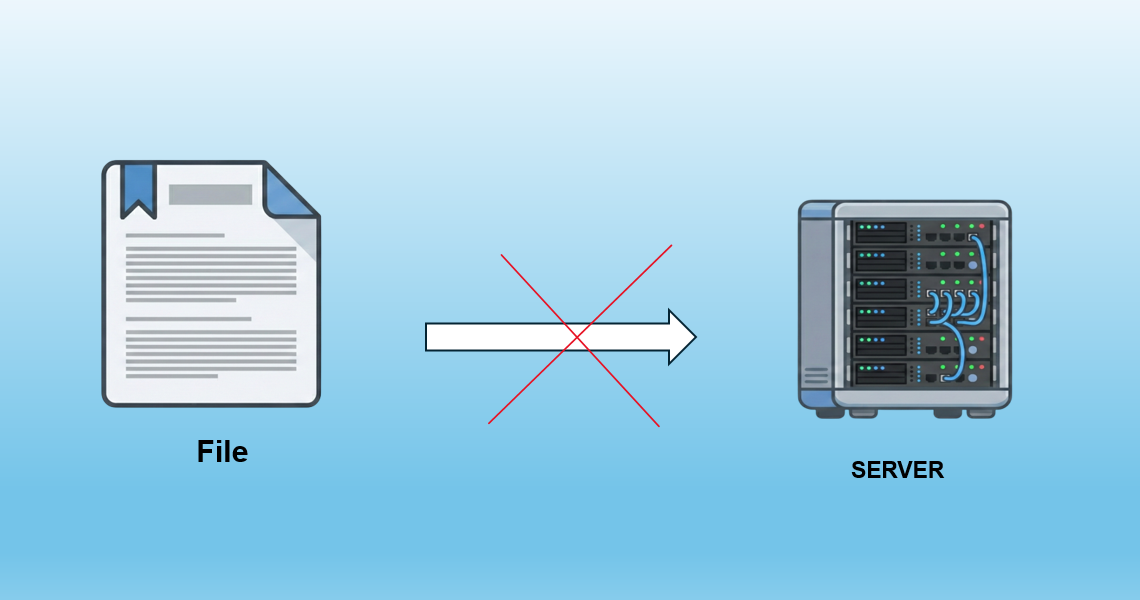
When you use my tool to merge, split, or compress a PDF, the website just sends the code to your browser. Your browser takes that code and runs it. Your file stays in your computer’s memory (RAM). It never travels over the internet.
This is much better for privacy. Since the file never leaves your device, I cannot see it. No hacker can intercept it. It is physically impossible for there to be a data leak because there is no data transfer.
How to Test This Yourself
I don’t want you to just trust me. In cybersecurity, we have a saying: "Trust, but verify." You can test if a tool is truly client-side very easily:
- Open PrivatePDF.tech.
- Wait for the page to load completely.
- Turn off your Wi-Fi or unplug your internet cable.
- Try to merge or split a PDF.
If it works while you are offline, that means the code is running on your machine. The file isn't going anywhere. If the site gives you an error, then it was trying to upload your file.
The Exception: Converting Complex Office Files
Now, I want to be completely honest with you. While I prioritize local processing for everything I can, there are limitations. Browsers are great at handling PDF files directly. However, converting a Microsoft Word, Excel, or PowerPoint file into a PDF is extremely difficult to do inside a browser. The code for that is very heavy and complex. It requires fonts, formatting engines, and layout calculations that JavaScript in a browser struggles with.
So, for Office-to-PDF conversions, PrivatePDF.tech uses a hybrid approach. If you need to convert a Word doc, the file does go to a server. But here is the difference: as a security student, I configured this server strictly:
- No logging: The server processes the file and immediately forgets it.
- No storage: The file is deleted the moment the conversion is done.
- Secure connection: Everything happens over an encrypted connection (HTTPS).
I believe in transparency. If a tool works locally, I will tell you. If a tool needs a server, I will tell you that too. Most "free sites" do not tell you anything. They just take your data.
Why Privacy Matters for Everyone
You might think, "I have nothing to hide. Why should I care?" Privacy is not just about hiding secrets. It is about safety. Maybe you are combining tax documents. Those have your Social Security Number or ID number. Maybe you are compressing a scan of your passport. Maybe you are working on a contract for your boss. If these files leak, it can lead to identity theft or legal trouble. By using client-side tools, you reduce your "attack surface." In simple terms, you give bad guys fewer chances to attack you.
Speed and Convenience
There is another benefit to processing files locally: speed. If you have a slow internet connection, uploading a 50MB file takes a long time. Then you have to wait for the server to process it. Then you have to download it again. With client-side processing, it is almost instant. Your computer’s processor is likely faster than your internet connection. You drag the file in, the JavaScript runs, and boom—it is done. You save time and data.
My Advice as a Cybersecurity Student
If you want to keep your digital life safe, here are a few simple rules I follow:
- Stop using random extensions. Browser extensions can read everything on your web pages. Only install the ones you really need.
- Look for the Lock. Always check for the HTTPS lock icon in the address bar.
- Prefer Local Tools. Whenever possible, use tools that work on your device, not on a cloud server.
Give It a Try
I built PrivatePDF.tech because I needed it. I wanted a fast, secure place to manage my documents without worrying about where they end up. It is free. There are no accounts to create (because accounts mean storing user data, and I don’t want your data). There are no hidden tricks.
It is just a simple, secure tool built by a student who cares about privacy. Next time you have a PDF task, give it a try. Your data belongs to you, and I intend to help you keep it that way.